I was idly scrolling through my own blog recently when a nagging pattern finally clicked: the “Related Posts” section at the bottom of every article was serving up the exact same recommendations, regardless of what I was reading.
After a moment’s reflection, the culprit became obvious. Every post on my site lives under the default “Uncategorized” category—and that’s entirely intentional. I’ve always preferred tags over categories; they feel more granular, more flexible, and frankly, better suited to how I actually organize content. The problem? My theme’s related posts algorithm was dutifully matching articles by category. Since everything shared the same umbrella label, the suggestions were effectively frozen.
So, could I tell WordPress to use tags instead?
As it turns out, absolutely. Here’s the fix:
Navigate to Appearance → Customize → Post Types → Single Post → Related Posts in your WordPress dashboard. Once you land on the Related Posts panel, you’ll see something like this:
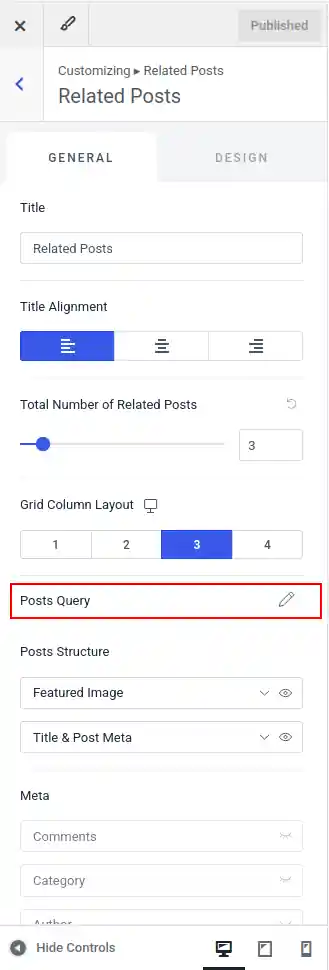
Click into Post Query, and you’ll be greeted with a handful of options. Set the matching criteria to Tags, switch the ordering to Random, and hit Publish. Just like that, your related posts will reflect the actual thematic connections you’ve curated through tagging—rather than defaulting to a single, meaningless category.
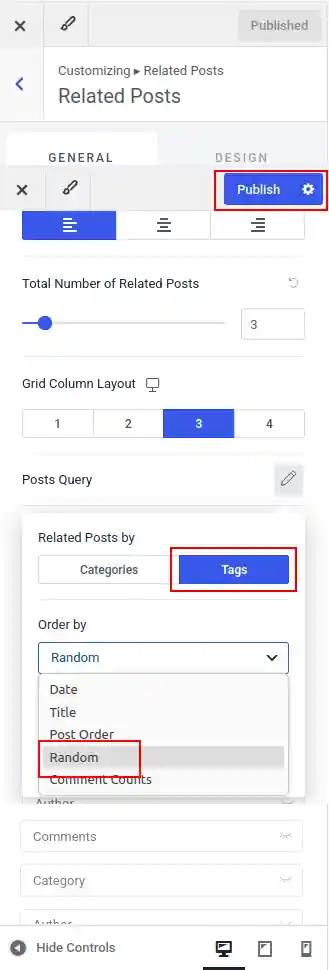
While you’re in there, it’s worth poking around the other settings too. You can adjust the number of posts displayed, toggle author visibility, and fine-tune a few other details to get the section feeling just right.
A quick note on versions: This walkthrough reflects WordPress 7.0 running Astra 4.13.3. If your interface looks slightly different, don’t worry—it’s almost certainly just a minor version discrepancy. The core logic remains the same.