On a personal blog where you’re the sole voice behind every post, displaying an author byline can feel like stating the obvious. The same logic applies to categories: if you’ve forgone traditional categorization in favor of a tag-based system, that extra metadata line simply adds visual clutter without adding value.
So how do you cleanly remove these elements from both your archive pages and individual posts? Here’s a streamlined walkthrough for Astra users.
Cleaning Up Your Blog Archive Page
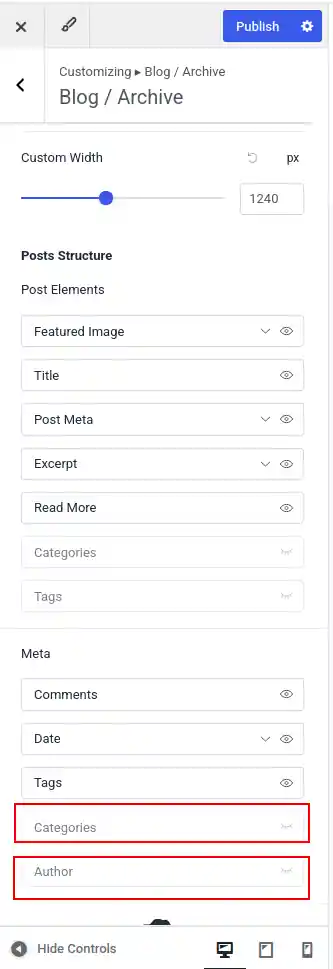
Head to Dashboard → Appearance → Customize → Post Types → Blog / Archive. Within this panel, you’ll find toggles to hide the author name and category labels entirely, along with an option to surface tags instead. Once you’ve adjusted the settings to your liking, click Publish to make the changes live.
Refining Single Post Pages
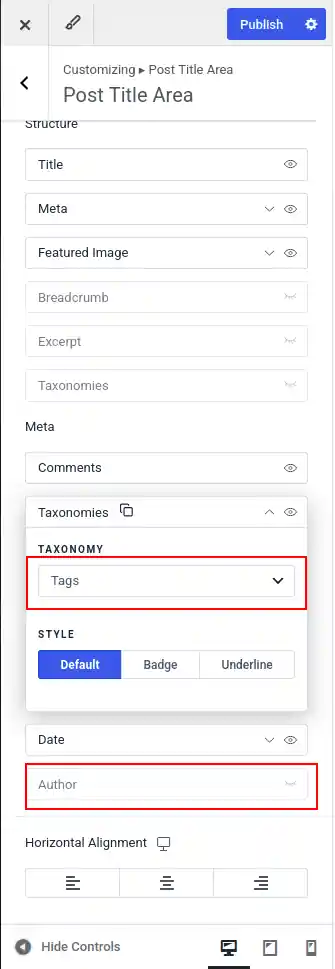
For individual articles, navigate to Dashboard → Appearance → Customize → Post Types → Single Post → Post Title Area. From here, you can suppress the author byline and swap out the default taxonomy display so that tags appear in place of categories. Hit Publish, and your updated layout will take effect immediately.
A Note on Versions: This guide was written using WordPress 7.0 and Astra 4.13.3. If your customizer panels look slightly different, don’t worry — minor UI variations across versions are normal, and the underlying workflow remains essentially the same.